Realtime engineering workspace

Your team. Your code. One conversation.

Communities, chat, voice and screen sharing connected to GitHub and Jira — with access computed from who actually works on each repository.

Get startedSee features
# backend-apilive

13:42 Alyfer opened PR #342 — feat: implement Redis caching

13:38 Ana joined the daily voice and is sharing her screen

13:31 CI failed on PR #337

13:21 João approved PR #334

Features

Everything the team uses every day

Community, code and conversation in one place, with access decided by who actually works on each repository.

Communities and channels

Organize the team the way it works

Communities with categories, text and voice channels, invites and roles with granular permissions.

  • Categories and channels arranged with drag and drop
  • Private channels and roles with per-channel permissions
  • Invite links and control over who joins
Realtime chat

Conversations made for people who write code

Realtime messages with Markdown, syntax-highlighted code blocks and mentions that reach the right people.

  • Markdown with code blocks and syntax highlighting
  • Mentions with suggestions and configurable notifications
  • Online presence and message editing
Direct messages

Conversations outside communities

When you sign in, DevColab opens on your friends and direct conversations. Add people from your communities or by e-mail, and choose who can write to you directly.

  • Friends, requests and suggestions from your communities
  • Message requests for people who are not friends yet
  • Profile card with roles, connected accounts and a quick message
  • Blocking that covers messages and requests
GitHub

Access follows who works on the repository

Connect the organization through the GitHub App: repositories become channels and only people with access to the repository join the channel.

  • Import repositories as channels
  • Channel access computed from GitHub permissions, revoked in real time
  • Pull requests in the timeline, in the channel panel and in the notification bell
  • Webhook health with failure retries
Jira

The sprint and the tasks inside the channel

Connect your Jira Cloud site: projects become channels with the sprint and the issues, and each task opens in a sheet where you comment, change the status and see the branches and PRs that implement it.

  • Panel with the active sprint, your issues and recent ones
  • Issue sheet: status, assignee, priority and comments with your own account
  • Branches and PRs carrying the task key linked both ways, in Jira too
  • Channel access from the project's permissions in Jira
Calendar

The daily and the release remind the team on their own

One calendar per community, with one-time or recurring events, reminders in the bell and by email, and a heads-up in the channel right on time.

  • Daily, weekdays, weekly, monthly or yearly, in each event's time zone
  • People involved or @everyone, with reminders from 5 minutes to 1 day ahead
  • A card in the channel when the event starts, mentioning everyone involved
  • Color, priority and a calendar with the next event up front
Voice

Join the call without leaving the channel

Low-latency voice channels, a speaking indicator and controls that respect the community's roles.

  • Speaking, microphone and sound indicators per participant
  • Listener mode when the role doesn't allow speaking
  • Microphone and audio output selection, automatic reconnection
  • Moderators mute, disconnect and end streams
Screen sharing

Games, movies and code, each its own way

Share a screen, window or tab and pick what you are showing: a game, a video or work. DevColab tunes resolution, frames and audio, uses the graphics card when it can and previews who is live.

  • Up to 4K at 60 fps, with variable frame rate, bitrate up to 20 Mbps and audio up to 192 kbps
  • Graphics card encoder (H.264 or AV1) when available, smoother in the desktop app
  • Preview who is live without joining the call, and one click on "Live" opens the stream
  • Full upload and download diagnostics to understand the quality
Per-person volume

Everyone hears the way they like

Adjust the volume of each participant and each stream just for you, without affecting anyone else.

  • From 0% to 200% per participant and per stream
  • Mute someone just for you
  • Preferences kept in your browser, per account
Repository channel

The whole repository in one conversation

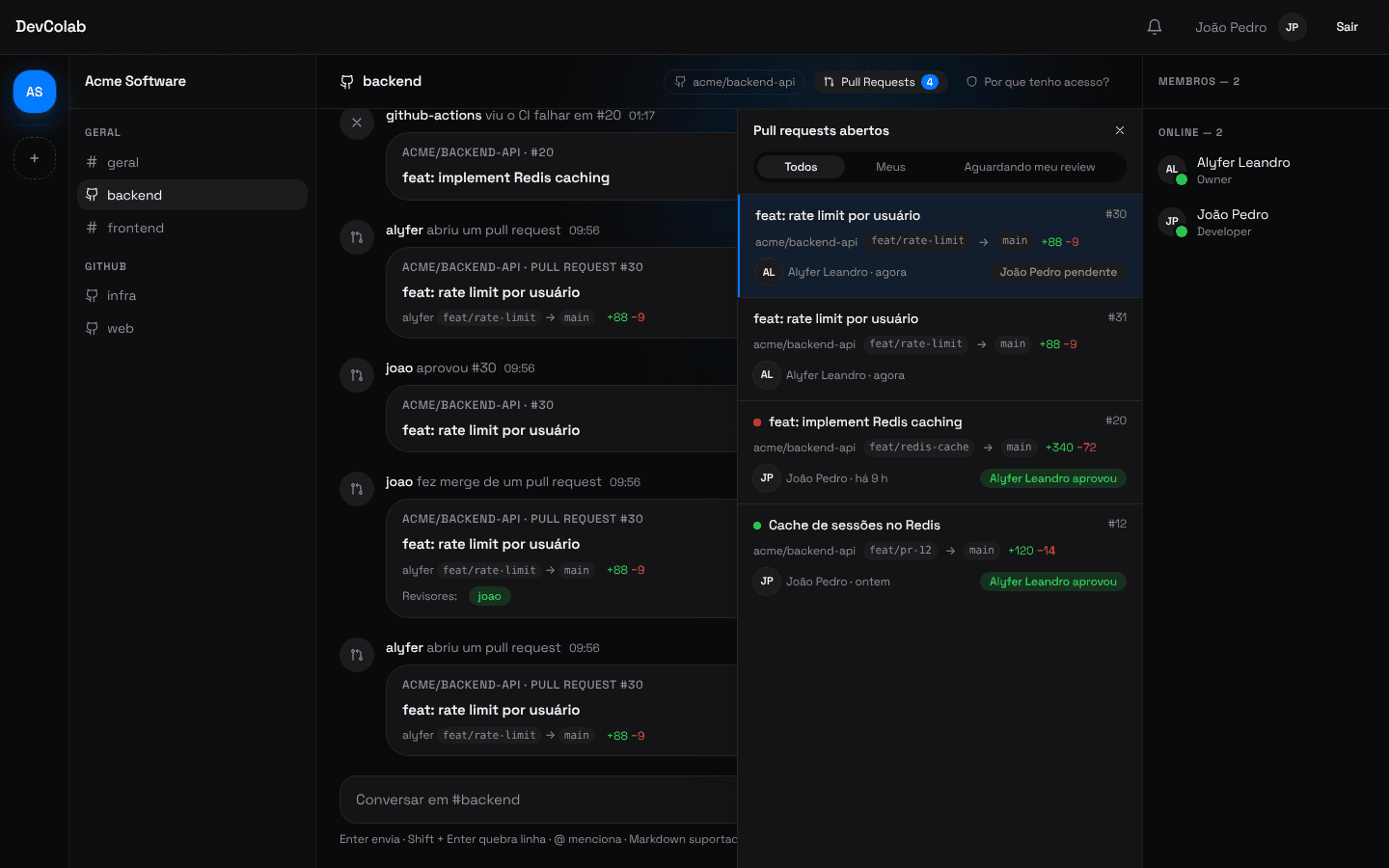
Each imported repository becomes a channel with the GitHub timeline and the pull request panel side by side, without switching tabs to see what changed.

Backend channel linked to the acme/backend-api repository, with the pull request timeline on the left and the open pull requests panel on the right

Repository timeline

Opened pull requests, reviews, merges and CI failures become cards in the conversation, in the right channel.

Pull request panel

All, mine or waiting for my review, with branch, change size and review status.

Access explained

"Why do I have access?" shows where your permission on the linked repository comes from.

How it works

From invite to call in minutes

  1. Create the community

    Sign in with Google, create the community and invite the team with a link.

  2. Connect GitHub

    Install the GitHub App on the organization and import repositories as channels with computed access.

  3. Talk and join voice

    Discuss pull requests in the right channel, join voice and share your screen when you need to show something.

Security and access

Who sees what, decided by the right source

Each channel's access comes from the community's roles and GitHub permissions, and is reevaluated whenever something changes.

Access computed, not copied

Whoever loses access to the repository loses access to the channel, including voice, without anyone having to remember to remove them.

Real-time revocation

Changes to roles, permissions or on GitHub reach open sessions and voice rooms within seconds.

Encrypted tokens

Integration credentials are stored encrypted, with key rotation.

Media outside the API

Audio and video travel through the media server with short-lived tokens; the platform decides who joins and with which rights.

Preferences that stay in the browser

Volumes and sharing choices stay in your browser and aren't sent to the server.

Desktop app

DevColab on your computer

It stays in the tray and keeps you connected, alerts you to mentions with system notifications, shows unread counts on its icon, controls the call from the menu and shares any screen or window, with your computer's sound on Windows and macOS.

Windows

Windows 10 or 11, 64-bit. Updates itself.

The installer isn't signed yet: if Windows warns you, click More info › Run anyway.

macOS

macOS 12 or later. New versions are announced in the app.

The first time, macOS blocks the app: open System Settings › Privacy & Security and click Open Anyway.

Linux

x64. The AppImage updates itself.

AppImage: make it executable and open it. deb: sudo apt install ./DevColab.deb. On GNOME, the tray needs the AppIndicator extension.

All versions
Coming soon

The team's work, connected to the conversation

Work Graph

Coming soon

A map of who works on what, linking repositories, issues, pull requests and conversations.

  • Work context next to the conversation
  • Who reviews, who implements, what's blocked
Frequently asked questions

Before you start

Do I need to use GitHub?

No. Communities, chat and voice work on their own. GitHub adds per-repository channels, pull requests and computed access.

How does Jira work?

Whoever manages the community connects a Jira Cloud site and imports projects as channels. Each person connects their own Atlassian account in My account, and the channel opens to whoever sees the project in Jira. From the issue sheet, each person comments, changes the status and assigns with their own account, and branches and PRs carrying the task key (like feat-DEV-12-login) show up linked to the issue.

Who can send me direct messages?

Your friends write directly. People who share a community with you send a request, which you accept, decline or block; in My account you can let anyone from those communities write directly. By e-mail, only a friend request arrives, and the sender gets the same answer whether the account exists or not.

Does it work on mobile?

The platform runs in the browser. Full adaptation for phones and tablets is in progress and arrives in upcoming versions.

Is there a desktop app?

Yes, for Windows, macOS and Linux, in the Desktop app section. It does everything the browser does, and it also stays in the tray, alerts you with system notifications and shares windows with your computer's sound.

Can I share my screen from a phone?

No. Mobile browsers don't offer screen capture; on a phone you watch other people's streams.

How do calendar reminders work?

Whoever can manage the calendar creates the event and picks the reminders. People involved get them in the bell, in their computer's notifications and, if the event asks for it, by email; each person can turn them off in My account.

Who can share and speak in voice?

The community's roles decide: connecting, speaking, sharing and moderating are separate permissions, revoked instantly.

Where is my data stored?

Messages and communities are stored in the platform's database. Audio and video aren't recorded, and volume preferences stay only in your browser.

Bring the team into one conversation

Create the community, connect GitHub and join voice.

Get started